Showing posts with label pdf manuals. Show all posts

Sunday, February 1, 2009

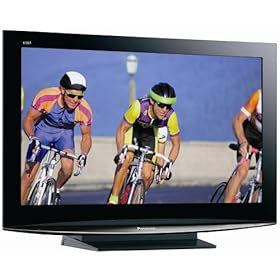
Panasonic TC-37LZ800 and Panasonic TC-32LZ800 manuals

Not only reviews, but personal experience have convinced me that Panasonic is currently perhaps the most reliable televisions in both plasma and LCD categories. I have seen a good number of commercial projects where Panasonic was the brand of choice. It is, of course, my tradition to make manuals easily available for every piece of electronics that comes to my attention.

Panasonic TC-37LZ800 and Panasonic TC-32LZ800 manuals

Wednesday, December 31, 2008

Samsung BlackJack II (i617) Review and User Manual (PDF)

I am switching from T-Mobile to AT&T Wireless. As a result my T-Mobile MDA will no longer work. Of course, I am fully aware that it is possible to "upgrade" the firmware, essentially unlocking this phone. Still, with so many options available from ATT&T, why not get a cheap and comparable phone from them and then decide if it is worth trying to unlock the old one?

After much speculation, I have decided to try Samsung BlackJack II. Three main features sold me on this one.

  • The screen is pretty large and quite suitable for what I end up using my T-Mobile MDA most of the time - reading ebooks. It is technically smaller than the MDA screen, but the resolution is the same.
  • There are many buttons I can assign for the purpose of turning pages. I will probably end up using the middle one.
  • The letter keys are conveniently located. You can enter text without having to using a slider. I loath texting, but this may be a very nice way to make some quick notes.
One big con for me was the lack of Wi-Fi. If I end up choosing a different device at the last moment, that's why. Hear this, Samsung? Also, as much as I like the black model, the so called wine colored BlackJack II has a different leathary back, making it much easier to hold the device. I have heard that the black ones can slip out of your hands pretty easily.

Samsung BlackJack II (i617) User Manual (PDF)

Monday, December 22, 2008

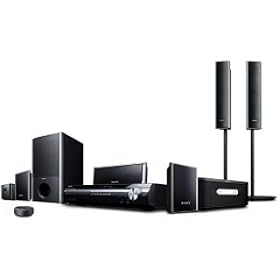
Sony DAV-HDX277WC, DAV-HDX279W, DAV-HDX576WF surround home theaters: PDF Manual

In terms of pure design, I must admit that the high-rising front and rear speakers on a lot of current home theater systems do not make me very happy. I checked the instructions manual in order to see if it is possible to make the appearance of these towers less obnoxious. It looks like all you can do is to adjust the mounting rod to make it shorter. But the good news is that these speakers are also wall-mountable, according to the manual.

Actually, it looks as if the presence of these stands in the retail box is among the features that separates DAV-HDX576WF from the other models. If you see no additional features that matter to you, keep this in mind when choosing a Sony home theater system.


PDF Manual for Sony DAV-HDX277WC, DAV-HDX279W, DAV-HDX576WF

See also:
Media Room Design Ideas

Sansa Fuze manual


The absolute best retail price I was able to find for Sansa Fuze was $60 (Costco). The sale lasted a few days, but it give a good indication of what kind of prices you should expect after Christmas. Anyway, I have snatched two Fuzes! The burden of giving mp3 players as gifts to people who are not technologically sophisticated is that you have to load them up with music. It's not easy, but I will try!

By the way, for people who never used an mp3 player before navigating the Sansa wheel can be a challenge, believe it or not. So, don't throw away the manual. And if you did, here it is:

Sansa Fuze manual

Friday, December 12, 2008

Sharp LC-32SB21U, Vizio VO32LF and VO37LF


The old TV set in the living room is on its last legs! The picture keeps collapsing into a bright, colorful yet very thin line. Some gentle banging on the side of the television temporarily fixes the problem, but is this exercise of strength even safe? Time to look for a new LCD TV!

I said this many times and I will say it again. There is no better place for getting a TV than Costco. They hand pick the models they sell from select manufacturers (Sony, Sharp, Philips, Vizio etc.) and offer very competitive prices. But the best thing ever is Costo's extended warranty. 2 years!

My initial pick was a 32 inch Sharp LC-32SB21U. It is now sold out at the local Costco store. I did have a few reservations about it, however. It is not a 1080p TV. But this may not be a big deal in an 32 inch model. Face it, the screen is simply not enough to reflect the nuances that Blu-Ray (and Blu-Ray only, mind you) are capable of producing. Is it really a big issue? On the hole, I think that Sharp has a much better picture than Vizio and I simply trust the brand a lot more. My 26 inch Sharp has been great. Anyway, unless LC-32SB21U reappears at the store I will probably go with one of the Vizio TVs: VO32LF or VO37LF. It is a common practice in less established brands to pack in a lot of feature at a low price. And that's ok. As long as they work. And remember, with Costco's 2-year warranty, if the TV breaks I can bring it back for full refund. And if it breaks afterwards, goodness only knows what kind of TV you will be able to pick up for $300 in a couple of years.


Vizio VO32LF manual
Vizio VO37LF manual

Friday, December 5, 2008

Sony BDP-S350 and Sony BDP-S550 Blu-ray players: Manuals


After using a few similar pieces of equipment most people don't really need a manual to figure out how to approach a new TV, DVD or a digital camera. But whenever something new, like blue-ray systems is rolled out it is a wise move to have a look at the manuals. After all, consider the fact that a manual is something you can have for free before you even buy the product (which is when you get the manual in the box).

Sure, Blue-ray is not much different from DVD players in most respects. There are a few things you should pay attention to:

  • Video connections. Unless you use high quality connections you will not get the HD signal that you are craving for.
  • Network connections. I bet your old DVD player did not have any?
  • Settings displays. There will be a few items you have never heard of
Sony BDP-S350 blu-ray player manual
Sony BDP-S550 blu-ray player manual