Here is one feature that may seem insignificant to someone, but for me, as an avid iPod user, it is quite important. Whenever I plug in my iPod to the computer with a USB cord (to charge, to update or to simply play the content) the iPod "forgets" the exact place where it was before the connection had been established. This is quite a nuisance, because I often listen to audio books and long podcasts, so it is difficult to find the exact location in the mp3 file. Now, when I put my iPod on the cradle of my Philips HTS3544 home theater not only it resumes playback from the exact place where I paused it, it retains the location after it's disconnected. It seems that the implementation of hardware connections is different in my home theater system. This might be something to consider when you are buying a home theater.
See also:
Home media room design

Friday, May 23, 2008


Home electirc generator for a home theater?
Let's imagine the unimaginable. You are at your home, quietly enjoying the newest installment of Hollywood magic on your big screen TV. Why, of course, you also have a home theater system and the sound is just out of this world. Well, I guess it has all been rather imaginable up to this point. Now, let's throw in the unexpected. Nothing catastrophic, but simply something unpleasant. A hurricane, a small tornado or perhaps a human error has caused the lights to go out. Yep, no power for your power-packed home theater! But nobody is hurt and there is absolutely no need for you go run about the neighborhood saving puppies out of burning houses and perform other heroic deeds that you are undoubtedly totally capable of. Now, why not finish watching the movie? Or do you have to spent several boring hours listening to the radio or the iPod until the battery dies? Well, all you need is an electric generator. Let's look at some numbers.
A typical house needs a 5-kilowatt portable generator. This should be enough to power a heating system and a few other essential pieces of equipment. The cost of such a generator is no less than $700. It will consume close to a gallon of gas per hour when running at full capacity. If you consider today's gas prices you are probably better off using the electric company for your daily needs. But a few gallons of gas to feel human in the most inhuman conditions of an electrical outage? To some folks this could be worth it! But then again, you could just use a portable DVD player...
A typical house needs a 5-kilowatt portable generator. This should be enough to power a heating system and a few other essential pieces of equipment. The cost of such a generator is no less than $700. It will consume close to a gallon of gas per hour when running at full capacity. If you consider today's gas prices you are probably better off using the electric company for your daily needs. But a few gallons of gas to feel human in the most inhuman conditions of an electrical outage? To some folks this could be worth it! But then again, you could just use a portable DVD player...
Wednesday, May 21, 2008
Portable ebook reader
OK, I am officially looking for a portable ebook reader! I definitely want an e ink based device, because I already have a very good smartphone that works fine for me. So, the biggest selling points for me would be:
- a larger screen than a PDA type reader
- ability to read image-based PDF files
- wide range of supported ebook formats, both commercial and free. Plain TXT is a must!
- the device must support Unicode
- convenient design and nice look. You know, I don't want to be embarrassed when people see me read this thing!
- some text entry mode would be nice, but this is not crucial
- decent screen quality. I am realistic and I understand that ebook readers with better screens are still a few years away, but I hope to choose the best that's out there right now.
- a lot of memory or support for high capacity SD cards. Chances are, If my smartphone supported HCSD I would not even need a portable ebook reader.
- easy syncing. WiFi would be nice.
- GeR2 from Ganaxa. A Vizplex e-paper portable ebook reader. Not for sale yet :(
- Sony PRS-505 portable ebook reader.
- Amazon Kindle portable ebook reader.
Tuesday, May 20, 2008
Best Digital Cameras
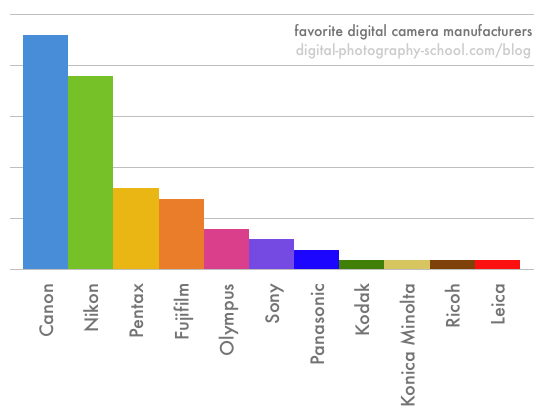
This is a very colorful representation of brand popularity at http://digital-photography-school.com.
Clearly, Nikon and Canon are the most popular. One must keep in mind that (for better or worse) this graph represents the likes and dislikes of professional photographers, and probably indicates their preferences as far as high-end digital cameras.
Monday, May 19, 2008
Sony Mini Laptop/Palmtop/Whatever you call it -- VAIO® UX Micro PC

Sony used to have a very attractive line of PDA-devices, which they discontinued along with many other manufacturers. Smartphones have largely replaced the need for these little computer wannabes. VAIO® UX Micro PC has some remnants of the old Sony design. The big difference: this little laptop/palmtop device actually runs Windows Vista! Here are the specs:
lightning-fast, full-functioning PC that fits in your pocket, this astoundingly compact device puts world-class computing in the palm of your hand. Featuring a cutting-edge, 48GB Solid State Drive and three to seven hours of battery life with a large capacity battery, the VAIO® UX Premium Micro PC is small enough to fit in your pocket and powerful enough to tackle the most complicated tasks. An Intel® Core™ 2 Solo ULV processor and a Windows Vista® Business operating system make the VAIO® UX a perfect fit in today's mobile computing landscape where power and portability are essential. And with advanced wireless technologies to keep you connected and a bundled Bluetooth® GPS receiver to keep you on course when traveling, you?ll be able go farther and do more than you could imagine.
Full-sized PC performance
Intel® Core™ 2 Solo Processor14 U2200 Ultra Low Voltage (1.2GHz1) Genuine Windows Vista® Business16 operating system The VAIO® UX Premium takes Micro PC modernization to a new level by utilizing a 48GB2 Solid State Drive (SSD) in place of the typical spinning hard disk drive found in most PCs. AT&T national wireless EDGE network13 to extend your wireless coverage beyond LAN access networks and hotspots3
Now, the question is: Why couldn't this mini laptop also be a phone?
Playstation 3 Manual
As I looked for a Playstation 3 on eBay, I was greatly surprised that one would ever sell ANYTHING there without a manual. Some people get nervous when they consider the prospects of dealing with electronic equipment without proper instructions. And sometimes they are right...
Playstation 3 manual (20 gb model)
Playstation 3 manual (20 gb model)
Friday, May 9, 2008
A little Sharp SH12U tip
When I pop in a DVD I usually immediately have to look for the TV remote, so I can change the input to HDMI. Well, Sharp SH12U has buttons on the top right side (hidden by the front panel). The right most button is power, and the button next to it is INPUT. This button is round to the touch, so you can be easily assured that you are not pressing the POWER button. A little time saver, because the TV remote is not always where you think it should be...
You have to know your TV, people!
You have to know your TV, people!
Subscribe to:
Posts (Atom)