Saturday, February 23, 2008

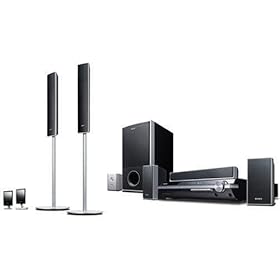
Sony Bravia DAV-HDX501W home theater review + manual

Sony DAV-HDX501W Bravia 5-Disc Home Theater

This is a Sony Home theater I would recommend if you need a digital input (I do), and can swing over $500 (I don't).

Pros:


  • Digital input port
  • Wireless speaker connectivity
  • Upconverts to 1080p
  • Microphone calibration

Cons:

  • No Blueray capability
  • Maybe, instead of 1080 conversion you should wait for Blueray-based home theaters to be perfected?


Here is the manual for this Sony Bravia hdx501w

Friday, February 22, 2008

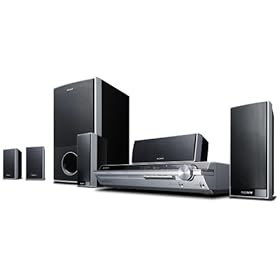
Sony BRAVIA DAVHDX265 home theater review + manual

Sony BRAVIA DAV-HDX265 home theater

Pros:

  • Affordable
  • The sound receives good to great reviews.
  • Convenient automatic calibration through a microphone
  • You can change the brightness of the front panel (through the System menu) - a very nice feature if you keep this unit in the bedroom, let's say.
  • Parental control can be set for up to 40 discs.
  • Digital media port for connecting a portable audio device or computer
  • Plays DivX videos
  • Upconverts DVDs to 1080i
  • Theater Sync function - only with Sony TVs.
  • DAV-HDX267W is supplied with a WAHT-SD1 wireless kit

Cons:

  • Lacks digital input. Not a very important feature for some people, but if you have been assuming that a Sony home theater would have this by default, beware. To put it plaintly, you won't be able to get digital surround sound from any other source, other than the unit itself. You can use stereo input through the Digital media port, but that's just not the same, don't be confused by that.
  • Speaker connectors are not standard.
  • On-screen menus can be difficult to navigate.
  • The disc changer is somewhat slow to respond.


Conclusion? My personal favorite remains Philips HTS3555! This one probably only makes more sense if you have a Sony TV.


Here is the manual that also covers: Sony DAV-HDX266 and Sony DAV-HDX267W:


http://www.sonystyle.com/wcsstore/SonyStyleStorefrontAssetStore/pdf/DAVHDX265.pdf


"Official info":

HDMI™ Output with 1080i upscaling of DVD Media

Reads the data on a standard DVD at 480p and upscales the video resolution up to 1080i resolution for your compatible HDTV. This allows for you to enjoy superb video performance while delivering digital video and audio over one simple cable.

BRAVIA®Theatre Sync™

As a leader in products with HDMI connectivity, Sony has created BRAVIA® Theatre Sync™ technology to go beyond simple audio and video transmission. When combined with a select number of BRAVIA® LCD televisions and other Sony audio and video products, control functions will also be transmitted via the HDMI cable. With “One Touch Play” operations that took several steps have been reduced to one. Press the PLAY button on the remote, watch the audio and/or the video component(s) turn on then the BRAVIA® television will turn on and switch to the correct video input...Simple...Easy...BRAVIA® Theatre Sync™

DIGITAL MEDIA PORT

As the demand for digital content continues to be strong, here's the challenge: how do you integrate music in various forms into a home theater system? The answer: Sony’s DIGITAL MEDIA PORT (DMP). Together with one of the DMP accessories (sold separately), this proprietary interface adds networking and connectivity to the options of home theater systems and components, connects with various devices which provide the ability to control and power devices while making set up easy and operation simple. The DMP accessories will include a PC Client device, Bluetooth® receiver and Audio Docking Stations compatible with Network Walkman™ and iPod® products. So regardless of how you store your music, Sony’s DIGITAL MEDIA PORT offers an access point to integrate your portable music into a traditional home theater system.

Digital Cinema Auto Calibration-2

Now the optimal speaker settings for your living room are only a press of button away. Simply place the included microphone in your listening position and allow the strength of Sony’s Digital Signal Processing to take over. Speaker placement, distance, and delays are all calibrated automatically to ensure a worry free listening experience.

Portable Audio Enhancer

Simplified front audio and video connections are part of what makes the DAV-DX265 ideal for today’s portables. Beyond the simplified connection a powerful Digital Signal Processor is used to expand the quality from any device that is connected.

Multi Speaker Formation

Select from the on screen display to configure the system for different speaker layout.

Music/Movie Mode

System automatically adjusts sound characteristics to match the source (movie vs. music).

Monday, February 18, 2008

Olympus Stylus 820 Digital Camera - Manual and specs

A superb camera, except for one thing: image quality. I have read reviews about the bad quality of pictures taken by this camera and my personal experience from playing with it is just the same. Weather resistance is a big feature on many Olympus Styluses. Image Stabilization is a perfect feature to go with a slightly above average 5x optical zoom. I can only hope that Olympus will manage to improve the image quality. Their website now lists Stylus 840, but I haven't seen in in person just yet.

Olympus Stylus 820 manual

Olympus Stylus 820 specs:
  • 5x Optical Zoom
  • 2.7-inch HyperCrystal™ LCD
  • Digital Image Stabilization
  • All-Weather
  • Face Detection

Sunday, February 17, 2008

Sony Cybershot DSCW80 - one sweet deal at Staples

$130 after savings. Would have gotten it, but they were out of stock, even at "the other store". No rain check either. Really disappointing.


The camera is around $170 at Target, on sale. Unfortunately, I could not find a working model at stores. I did own at least two Cybershots and they held up pretty well. Only had a problem with the zoom mechanism. This model is only slightly heavier that other cameras in this class. The menu seem to be fairly intuitive. Sony cameras use MemorySticks, but memory in general is so cheap that this is only a minor inconvenience.


Here is the manual:

http://129.33.22.12/release/DSCW80.pdf


  • 7.2 megapixels, ideal for prints up to 13" x 19"
  • 3x optical/2x digital zoom
  • Face Detection - reveals faces in shadow, makes skin tones look more natural and eliminates harsh facial glare
  • Accepts Memory Stick PRO Duo™ memory cards (31MB internal memory included)
  • 2.5" color LCD screen
  • Super SteadyShot® optical image stabilization and high sensitivity (ISO 3200) compensate for shaky hands, minimizes blur and brightens images
  • Present your pictures with direct HD (high definition) output to compatible HDTV screens
  • The HD Slide Show option can be accompanied by your choice of visual effects and any of four preset musical selections stored in memory
  • 9-Point Auto Focus gives you greater creative freedom to compose your image
  • In-Camera Red-Eye Reduction Reduce irritating "glowing eyes" that can ruin even the most creative photos at the touch of a button
  • Color: Silver

Nikon Coolpix s10 digital camera manual and specs

Some people advise against having too much zoom in a camera. My question is: how can you have too much zoom? Nikon s10 is a slightly older model, only 6 megapixels. Truly, though, this is enough, especially if you can zoom in at 10x.

Here is the manual:

http://www.nikonusa.com/pdf/manuals/noprint/S10_en_noprint.pdf


Amazing 10x Optical Zoom-Nikkor Glass Lens that fits in your pocket


Vibration Reduction minimizes the effect of camera shake


Incredible, Bright 2.5-inch LCD offers 170-degree wide-angle of view, making it easy to show your pictures to family and friends


Auto adjusts up to ISO 800 for sharp pictures even in lower light


Nikon In-Camera Innovations which include: In-Camera Red-Eye Fix(TM) to automatically remove most instances of red-eye in the camera, Face-Priority AF Nikon's face-finding technology that automatically finds and focuses on face(s), and D-Lighting which lightens dark images, in-camera, for great prints right out of the camera.


Pictmotion(TM) creates in-camera slide shows with your music.


USB and Pictbridge compatible