Friday, August 20, 2010

Philips DCM109/37 Cube Micro Music System Dock for iPod/iPhone


Just bought a Philips Cube DCM109/37, primarily to use with iPods and iPhones. I am no audiophile, but to my taste the sound coming out of these speakers is very satisfactory. Bass, high frequencies, clarity, volume - I am actually quite impressed. The iPod dock is a little bit strange. Instead of a bunch of inserts to match every model of iPods and iPhones ever made, this model has a little plastic piece that pushes on the iPod from behind as it sits on the cradle, keeping it in place. I'd say that it probably pushes too hard, so some unites may get scratched. I think I will end up using the auxiliary input most of the time, and only put my devices on the cradle when they are being used for a long time. In general, it seems like the iPod capability was very much an afterthought - the iPod component is slapped onto the back of the main unit. Not the best visual design in the world, but I will live with it. Philips Cube has a clock display, but the size of the digits is very small, so it is hardly useful as an clock (a very popular application of many iPod docking systems). The round LED display remains softly lit even when the unit is not on, so it may not be the best solution for the bedroom.

Tuesday, June 22, 2010

How can I make sure that UPS delivers my packages to the right address?


What's the fun of online shopping if your packages never arrive?

I have had many instances when UPS incorrectly delivered my packages. The reason is the driver's lack of attention. Even though my street is well marked they miss a turn and end up on a street that has exactly the same name, except it's a Road, not a Street. I assume they have GPS, they simply don't use it. Here is what I did. Amazon offers a service called Prime. Generally, you have to pay for it, but you can also use it free as a trial. Amazon makes sure that you don't feel bad about using something that you will cancel. In fact, they make it extra easy to cancel, but for a month you can be ordering numerous items that are worth just a couple of dollars and have them delivered by UPS or FedEx in just two days or less. You better believe that the drivers will know your address well from now on! Actually, I feel like I am doing something nice for everybody in the neighborhood, too.

Thursday, April 22, 2010

iPhone text editors

It is apparent that serious software developers do not consider worth their effort to create full-featured applications for iPhone or iPod Touch. Otherwise it is impossible to explain the absence of some very basic programs such as a well designed word processor for iPhone. Everything that I was able to find is very rudimentary. After some searching I zeroed in on three apps that I like. One became my text editor of choice.

1. Documents (free). This app allows syncying with Google Docs, which is very convenient. Unfortunately, it is impossible to change font size and the text ends up being rather tiny.

2. WritePad (free). A decent program. I think it is not very well described in the snippet on AppStore. Here is why. This app supports handwriting recognition. Somehow, the impression that one receives is that it does just that. However, you can use normal iPhone on-screen keyboard. Font size is changeable. I really like this program, but in its present version it does not allow to change the color of the background. This happens to be a crucial feature for me.

3. WriteRoom ($4.95). This program has its roots in a word processor for Mac OS, so the author probably knows what he's doing. You can change the color of the background and the font size. You can easily go from document to document using arrows at the bottom of the screen. Also, this app is the best in terms of saving work as you type. You will not loose work after accidentally hitting the home button on your iPhone. There is also a full-screen mode.

So my suggestion is that you try WritePad first. If you are not satisfied consider purchasing WriteRoom.

Tuesday, April 6, 2010

Under-cabinet radio with iPod dock: Hamilton Beach


Hamilton Beach UTC (HU384SA)
is a good example of how unexpected a relatively simple device can turn out to be in terms of its features. I am used to the iPod dock that came with my Philips home theater, so I thought that something that is actually built with a dedicated iPod dock would have similar functions. Not so fast. Turns out, you cannot navigate the iPod from this under-cabinet device. No way, no how. You probably have guessed that is does not have a remote. Wrong. It does! But this remote bizarrely focuses on a rather obscure feature of the device: the kitchen timers. More intriguingly, because HU384SA has two such timers, they both have stop and start buttons on the remote. There are also volume buttons. And that's it. You cannot even skip tracks using this remote!

What this should teach everybody is that you should always make sure that the product you are buying supports the features you want even if the features seem entirely indispensable.

However, if these shorcomings are not scaring you, at $50-60 this is not a bad buy. Contrary to some other under-cabinet radios on the market this system actually charges the iPod, not just uses an audio connector to play music while draining a battery (especially a big problem for iPhones). You may also want to look at SDI iHome IH36W Clock Radio.

By the way, Pandora worked exceptionally well when I tested my iPhone 3Gs with this unit. Over EDGE!

Monday, February 1, 2010

iPhone battery problem (and solution)

When my iPhone's battary totally died (partially because I wanted to run it down, as often recommend) I charged it to 100%. To my great surprise, only a few hours later, without much use, the battary was down to 65%! I charged it again, but it started to leak juice again. I keep all battary-intensive tasks at a minimum, but I checked and rechecked the setting several times. Nothing!

Here is how I solved the problem. I enabled airplane mode for just a few seconds. I charged the iPhone again. The problem dissspeared. The phone is holding the charge much better. Not being an Apple engender, I cannot explain all this. Maybe there is some process that was lingering in the memory. Anyway, from now in I just might switch to airplane mode every once in a while.

Wednesday, January 27, 2010

iPad picture (the real deal), price and specs

Well, here it is. iPad.

Can't say that I am disappointed, because I did not expect much. It is too big to carry around. A stay-at-home device for me, because my commute is too rough. It beats Amazon Kindle, but I don't like Kindle for all the same reasons. It is really strange to see that they are showing us all those subway maps on the iPad. Maybe Steve Jobs travels first class on the subway?

OK, iPad's specs:

.5 inches thick
compass, speaker, microphone, N-Standard Wi-Fi
16GB or 64GB
3G, WiFi.
No SD!


I am guessing no Flash support and no Windows Media support.


iPad AKA a huge iPod touch!

The iBooks app is an obvious thing. But I really must guess that iBooks will be available on iPhone.

PRICE: $499 for a 16gb model!

People who just bought Kindle DX should probably start crying now.

To summarize: Man, am I glad to have a regular old iPhone 3gs! I will probably get iPad third generation, as well.

Tuesday, January 19, 2010

Best case for iPod -- what to consider

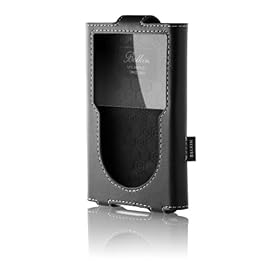
When I was exclusively using an old iPod Photo I liked a leather flip case. One майор inconvenience was that when the case's flap was difficult to open because the audio cable went right through it. And of course, it was impossible to put the iPod on the dock without taking it out of the case first. So, when I started looking for a case for iPod Classic, I decided to get a leather case, but the one that does not have a flap. The Belkin case pictured here works well. I especially like how the earphone cord can be wrapped around it to stay in place when not in use. However, new iPods can be used to watch movies and videos. This creates a different approach to what's important when choosing an iPod case. You see, the plastic that is used to protect the screen in flapless cases can get dirty so easily. It would be easy to go to a design with a flap, which does not have a screen protector. But then I am back to the old problem of not being able to open the flap all the way and having to keep it from shutting while watching a video. So, I am thinking about getting a sold plastic case, because even though the screen will be covered with plastic, this kind of plastic can be easily wiped before viewing videos on the iPod. I just wish I could have a case with a soft leather back.

To sum it up: remember that the video capability really changes what you might be expecting from you iPod case.

See also:

Best place to shop for an iPhone case.