Tuesday, April 6, 2010

Under-cabinet radio with iPod dock: Hamilton Beach


Hamilton Beach UTC (HU384SA)
is a good example of how unexpected a relatively simple device can turn out to be in terms of its features. I am used to the iPod dock that came with my Philips home theater, so I thought that something that is actually built with a dedicated iPod dock would have similar functions. Not so fast. Turns out, you cannot navigate the iPod from this under-cabinet device. No way, no how. You probably have guessed that is does not have a remote. Wrong. It does! But this remote bizarrely focuses on a rather obscure feature of the device: the kitchen timers. More intriguingly, because HU384SA has two such timers, they both have stop and start buttons on the remote. There are also volume buttons. And that's it. You cannot even skip tracks using this remote!

What this should teach everybody is that you should always make sure that the product you are buying supports the features you want even if the features seem entirely indispensable.

However, if these shorcomings are not scaring you, at $50-60 this is not a bad buy. Contrary to some other under-cabinet radios on the market this system actually charges the iPod, not just uses an audio connector to play music while draining a battery (especially a big problem for iPhones). You may also want to look at SDI iHome IH36W Clock Radio.

By the way, Pandora worked exceptionally well when I tested my iPhone 3Gs with this unit. Over EDGE!

Monday, February 1, 2010

iPhone battery problem (and solution)

When my iPhone's battary totally died (partially because I wanted to run it down, as often recommend) I charged it to 100%. To my great surprise, only a few hours later, without much use, the battary was down to 65%! I charged it again, but it started to leak juice again. I keep all battary-intensive tasks at a minimum, but I checked and rechecked the setting several times. Nothing!

Here is how I solved the problem. I enabled airplane mode for just a few seconds. I charged the iPhone again. The problem dissspeared. The phone is holding the charge much better. Not being an Apple engender, I cannot explain all this. Maybe there is some process that was lingering in the memory. Anyway, from now in I just might switch to airplane mode every once in a while.

Wednesday, January 27, 2010

iPad picture (the real deal), price and specs

Well, here it is. iPad.

Can't say that I am disappointed, because I did not expect much. It is too big to carry around. A stay-at-home device for me, because my commute is too rough. It beats Amazon Kindle, but I don't like Kindle for all the same reasons. It is really strange to see that they are showing us all those subway maps on the iPad. Maybe Steve Jobs travels first class on the subway?

OK, iPad's specs:

.5 inches thick
compass, speaker, microphone, N-Standard Wi-Fi
16GB or 64GB
3G, WiFi.
No SD!


I am guessing no Flash support and no Windows Media support.


iPad AKA a huge iPod touch!

The iBooks app is an obvious thing. But I really must guess that iBooks will be available on iPhone.

PRICE: $499 for a 16gb model!

People who just bought Kindle DX should probably start crying now.

To summarize: Man, am I glad to have a regular old iPhone 3gs! I will probably get iPad third generation, as well.

Tuesday, January 19, 2010

Best case for iPod -- what to consider

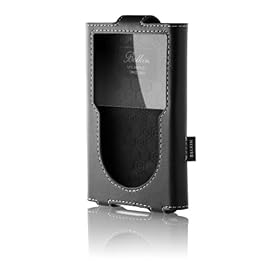
When I was exclusively using an old iPod Photo I liked a leather flip case. One майор inconvenience was that when the case's flap was difficult to open because the audio cable went right through it. And of course, it was impossible to put the iPod on the dock without taking it out of the case first. So, when I started looking for a case for iPod Classic, I decided to get a leather case, but the one that does not have a flap. The Belkin case pictured here works well. I especially like how the earphone cord can be wrapped around it to stay in place when not in use. However, new iPods can be used to watch movies and videos. This creates a different approach to what's important when choosing an iPod case. You see, the plastic that is used to protect the screen in flapless cases can get dirty so easily. It would be easy to go to a design with a flap, which does not have a screen protector. But then I am back to the old problem of not being able to open the flap all the way and having to keep it from shutting while watching a video. So, I am thinking about getting a sold plastic case, because even though the screen will be covered with plastic, this kind of plastic can be easily wiped before viewing videos on the iPod. I just wish I could have a case with a soft leather back.

To sum it up: remember that the video capability really changes what you might be expecting from you iPod case.

See also:

Best place to shop for an iPhone case.

Sunday, January 17, 2010

Toshiba 40RV525R Manual


Toshiba 40RV525R
is the most recent incarnation of an LCD TV whose manufacturers believe it to be of utmost importance to make sure that viewers not even for a second forget the brand of their television. As a result, the front panel of 40RV525R features an LED "Toshiba" logo. In a sharp departure from Vizio, however, this light can be turned off in the menu, as described on page 30 of the manual.

Toshiba 40RV525R PDF Manual

Wednesday, January 13, 2010

Chinon AVi - iPod Docking System with LCD (review + manual)

Chinon AVi packs a lot at a very attractive price of $199. It's an iPod dock, an alarm, an FM radio and a 7 inch Digital TV. In my opinion, a perfect thing for the kitchen. Or is it?

Now, keep in mind that recently Apple made it impossible to use third-party cables to connect iPods to television sets. You would have to pay $40 just for a set of composite or component cables at an Apple store. Apple-made cables have a special chip that's required by the newest Apple devices. My biggest concern is that this docks not able to overcome this hurdle. A fast scrolling animation of supported iPods on the manufacturer's site includes a 2009 120gb model, but not the 7g 160gb iPod. The iPod Support table does not make a distinction between various kinds of iPod Classic, but adds this: "please note that some iPod models may only support viewing of photos or slideshows on the iPod display and do not support the TV-out function". I must clarify that the 2009 160gb iPod (7th generation) does have a TV-out feature, but you may have to use an Apple cable, as I mentioned above. What this boils down to is that you may end up getting those $40 cables at the Apple store after all! Luckily, this device has video in, but at this rate you can be getting any LCD TV you like, not just the Chinon dock.

The manufacturer does not make it clear if the dock supports iPhones, but this is probably due to some intricate details of Apple licensing of the "Made for iPod" logo.

Another big issue is that the digital tuner in this dock only supports ATSC, not QAM. You will not be able to plug it directly into the cable outlet. Only off-the-air signals can be received. Unless, of course, you have a cable box, but then again, why not use a regular TV?

The bottom line is that you are probably better of with a regular decent audio system that has an iPod dock. The audio out feature works very well for all kinds of iPod devices. And get a small TV if you need one for the kitchen or wherever. You can always connect your supported iPod to it using cables, even you have to buy them directly from Apple. This Chinon AVi dock is more of a novelty item, only useful for brief outdoor use.


Chinon AVi Manual

See also:

Under-cabinet radio with iPod dock: Hamilton Beach

Sunday, January 10, 2010

Fuji S1500FD manual

The Fuji S1500 continues the "tradition" of Fuji 1000. This may very well be my next camera. As usual, one thing I can get for free is the manual, even though it eventually comes in the box.
Fuji S1500 manual