Monday, December 22, 2008

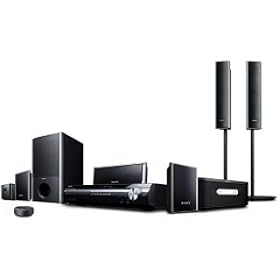
Sony DAV-HDX277WC, DAV-HDX279W, DAV-HDX576WF surround home theaters: PDF Manual

In terms of pure design, I must admit that the high-rising front and rear speakers on a lot of current home theater systems do not make me very happy. I checked the instructions manual in order to see if it is possible to make the appearance of these towers less obnoxious. It looks like all you can do is to adjust the mounting rod to make it shorter. But the good news is that these speakers are also wall-mountable, according to the manual.

Actually, it looks as if the presence of these stands in the retail box is among the features that separates DAV-HDX576WF from the other models. If you see no additional features that matter to you, keep this in mind when choosing a Sony home theater system.


PDF Manual for Sony DAV-HDX277WC, DAV-HDX279W, DAV-HDX576WF

See also:
Media Room Design Ideas

Sansa Fuze manual


The absolute best retail price I was able to find for Sansa Fuze was $60 (Costco). The sale lasted a few days, but it give a good indication of what kind of prices you should expect after Christmas. Anyway, I have snatched two Fuzes! The burden of giving mp3 players as gifts to people who are not technologically sophisticated is that you have to load them up with music. It's not easy, but I will try!

By the way, for people who never used an mp3 player before navigating the Sansa wheel can be a challenge, believe it or not. So, don't throw away the manual. And if you did, here it is:

Sansa Fuze manual

Monday, December 15, 2008

Vizio power light

Vizio TVs have a very obnoxious feature. On the front panel there is an LED light in form of the brand's logo: Vizio. When the TV is off this light is orange, and it turns green when the set is on. It is astonishing that some people actually like this feature, according to some reviews. What is the point of this? So we accidently don't forget the brand of the TV we are watching? I have searched all over the place, but I was unable to find any clever hack that would turn of this "feature." The only thing I could find is this tread about accessing the service menu:

http://www.hdtvoice.com/voice/showthread.php?t=30952

I don't have a Vizio TV just yet (and frankly I am looking at other models just because of this problem), so I cannot find out whether there is some way to turn of this light using the service menu...

Friday, December 12, 2008

Sharp LC-32SB21U, Vizio VO32LF and VO37LF


The old TV set in the living room is on its last legs! The picture keeps collapsing into a bright, colorful yet very thin line. Some gentle banging on the side of the television temporarily fixes the problem, but is this exercise of strength even safe? Time to look for a new LCD TV!

I said this many times and I will say it again. There is no better place for getting a TV than Costco. They hand pick the models they sell from select manufacturers (Sony, Sharp, Philips, Vizio etc.) and offer very competitive prices. But the best thing ever is Costo's extended warranty. 2 years!

My initial pick was a 32 inch Sharp LC-32SB21U. It is now sold out at the local Costco store. I did have a few reservations about it, however. It is not a 1080p TV. But this may not be a big deal in an 32 inch model. Face it, the screen is simply not enough to reflect the nuances that Blu-Ray (and Blu-Ray only, mind you) are capable of producing. Is it really a big issue? On the hole, I think that Sharp has a much better picture than Vizio and I simply trust the brand a lot more. My 26 inch Sharp has been great. Anyway, unless LC-32SB21U reappears at the store I will probably go with one of the Vizio TVs: VO32LF or VO37LF. It is a common practice in less established brands to pack in a lot of feature at a low price. And that's ok. As long as they work. And remember, with Costco's 2-year warranty, if the TV breaks I can bring it back for full refund. And if it breaks afterwards, goodness only knows what kind of TV you will be able to pick up for $300 in a couple of years.


Vizio VO32LF manual
Vizio VO37LF manual

Friday, December 5, 2008

Sony Reader PRS-700 product manual (user's guide)

For some reason, it was very difficult to find this manual:

Sony Reader PRS-700 product manual (user's guide)

The device looks OK, but I have not found any major improvements yet. Well, touchscreen is nice, but this is not so crucial for me.

Sony BDP-S350 and Sony BDP-S550 Blu-ray players: Manuals


After using a few similar pieces of equipment most people don't really need a manual to figure out how to approach a new TV, DVD or a digital camera. But whenever something new, like blue-ray systems is rolled out it is a wise move to have a look at the manuals. After all, consider the fact that a manual is something you can have for free before you even buy the product (which is when you get the manual in the box).

Sure, Blue-ray is not much different from DVD players in most respects. There are a few things you should pay attention to:

  • Video connections. Unless you use high quality connections you will not get the HD signal that you are craving for.
  • Network connections. I bet your old DVD player did not have any?
  • Settings displays. There will be a few items you have never heard of
Sony BDP-S350 blu-ray player manual
Sony BDP-S550 blu-ray player manual

Monday, October 13, 2008

Ebook reader: Devices you should not overlook

Ebook readers are becoming more and more popular, with Amazon's Kindle being a major driving force. Really, can there be any better advertisement for the concept of a small device specifically meant to replace traditional paper books than a prominent permanent ad on the main page of the biggest retailer on the planet? I had my own share of encounters with ebook readers, but overtime I realized that they may not be such a good idea after all. Primarily because almost everybody already has one or more electronic devices that can perform most functions of a book reader with ease. I still believe that he ePaper technology, used in ebook readers will continue to thrive, but at present you just may be better off with any one of the following devices:

  • PDA. Pocket-sized computers had the peak of popularity in the early 2000s. It is almost difficult to find them today, because smart phones took on most of their functions. Modern PDAs, such as ASUS 626 have large screens, very well suited for reading long texts. A wide selection of software is available, often at no cost, that allows one to read eBooks. My personal favorites are Haali Book reader and MobiBook.
  • Smart phone. Often these devices are the size of a PDA, but usually they have smaller screens.
  • Regular cellphone. Cell phones differ greatly in their configuration, but a lot of them have support for Java, which allows them to run ebook applications. It is extremely easy to load use such services as BooksInMyPhone.com